

Vending Machine
More actions
Shopping without the hassle of human beings! Use your wrench on this item to stock it with an item and set a price in World Locks. Other players will be able to buy from it! Only works in World-Locked worlds.
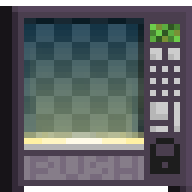

This item can't be destroyed - smashing it will return it to your backpack if you have room!
This item has special properties you can adjust with the Wrench.
| Data | Paint Preview | |
|---|---|---|
| Type | Vending Machine – Foreground | |
| Render Type | Single | |
| Collision Type | No Collision | |
| Hardness |  10 Hits 10 Hits  8 Hits – Restores after 5s of inactivity 8 Hits – Restores after 5s of inactivity | |
| Gems Drop |  N/A N/A | |
 1h 1h #000000FF #9DB2B5FF | ||
Paint Preview | ||
| Growtopia Store
|
|---|
| Purchase the Vending Machine for 8,000 in the Growtopia Store.
|
"Tired of interacting with human beings? Try a Vending Machine! You can put a stack of items inside it, set a price in World Locks, and people can buy from the machine while you sit back and rake in the profits! It's a perma-item, is never lost when destroyed, and it is not available any other way."
|
| Every purchase will give 1 item. |
| Growtopia Store
|
|---|
Purchase the Vending Machine for 5  Grow Voucher in the Growtopia Store. Grow Voucher in the Growtopia Store.
|
"Tired of interacting with human beings? Try a Vending Machine! You can put a stack of items inside it, set a price in World Locks, and people can buy from the machine while you sit back and rake in the profits! It's a perma-item, is never lost when destroyed, and it is not available any other way."
|
| Every purchase will give 10 items. |
The Vending Machine is an unsplicable non-solid foreground block which was added as part of Player Appreciation Week 2015 Day 6 on August 19, 2015.
Function
Putting a stack of items inside the machine and setting a price for it in World Locks will allow players to purchase the item. Diamond Locks and Blue Gem Locks will be automatically converted by Vending Machines during payment to cover the price.
When a machine runs out of stock, it will show an "OUT OF ORDER" message, which renders it unusable by everybody except the owner of the world.
The Vending Machine can be upgraded to a DigiVend Machine for 4,000 Gems.
Trivia
- The Vending Machine has been a prominent scamming method. Several precautions have been added to ensure players won't get scammed, such as:
- When a player changes the price of a Vending Machine, they will shout out the price of the item.
- The Vending Machine requires 15 seconds to "warm up" when an item is placed inside or when the price is changed.
- Only the owner of the world can change the price on the world's Vending Machines.
- The default number of items one can buy is zero. Players have to manually type out how many they want to buy.
- Smaller images of the sold goods are added to Vending Machines to prevent misreading.
- A trade confirmation screen has been added.
- One needs to be directly in front of a Vending Machine to be able to purchase its items.
- One cannot purchase anything from a Vending Machine placed in a locked area made public.
- One cannot break a Vending Machine placed in a public locked area either.
- The maximum limit of items which can be put inside a Vending Machine is set as 5,199.
- The maximum limit of World Locks which can be held inside a Vending Machine is set as 1,000,000 World Locks.
- The Vending Machine needs to be emptied first before it can be smashed.
- The feature to add the "OUT OF ORDER" sign and the World Lock icon onto a Vending Machine was added on Player Appreciation Week 2017.
- "OUT OF ORDER" is displayed either when the Vending Machine runs out of items to make a sale, or when the player manually sets the price to 0 World Locks, disabling the Vending Machine.
- When there are World Locks in the machine to collect, the black World Lock icon in the bottom right of the machine will become yellow.
- The feature to display the sold item or a warning sign on a Vending Machine was added on Player Appreciation Week 2018.
- If a player does not have enough World Locks to afford the items in a Vending Machine, a message will be displayed, saying: "You can't afford that many!"
- If a player tries to buy more items than available, a message will be displayed, saying: "There aren't enough available to fulfill your order!"
- If a player tries to buy more items than they can add to their inventory at once, a message will be displayed, saying: "You don't have room in your backpack!"
- If a player tries to buy a negative amount of items from a Vending Machine, a message will be displayed, saying: "NEGATIVE, DOES NOT COMPUTE"
- If a player tries to buy items from a Vending Machine that already has maximum World Locks, a message will be displayed, saying: "The Machine can't hold that many locks!"
- If a player tries to set the price as negative or more than 20,000 World Locks (200 Diamond Locks or 2 Blue Gem Locks), a message will be displayed, saying: "Well, that's a silly price."
- If a player tries to set the price as more than 200 items per World Lock, a message will be displayed, saying: "That price is so low, nobody can carry a World Lock worth of items!"
- Attempting to break a Vending Machine with items inside it will display the message: "Empty the machine before smashing it!"
- If a player tries to place untradeable items in a Vending Machine, a message will be displayed, saying: "Can't put that in a Vending Machine."
- If a player tries to place World Locks, Diamond Locks or Blue Gem Locks in a Vending Machine, a message will be displayed, saying: "No no no."
- If a player tries to place a fish in a Vending Machine, a message will be displayed, saying: "Fish would rot in a Vending Machine."
- As of Player Appreciation Week 2020 Day 4, the Vending Machine now gives a confirmation dialog before upgrading to a DigiVend Machine.
Gallery
-
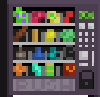 The appearance of the Vending Machine prior to Player Appreciation Week 2018.
 -
 The old Vending Machine store button.

